|
As an instructional coach, I have shared many reasons why deploying small group instruction within the classroom learning environments is essential. Within small group instruction, the teacher can differentiate the learning targets, quickly check for understanding, conduct in-the-moment formative assessments, build academic relationships, and conduct data meetings to help increase student ownership. The importance of small group instruction has grown even more due to the ease of using artificial intelligence within online applications. Artificial Intelligence (AI) is changing multiple aspects of the learning process, the creation elements, and classroom communication. The students can quickly request a four-paragraph persuasive paper on any topic with cited sources with the use of AI. The students can take a photo of a math problem, and the online application will not only provide the answer for the math problem but will showcase the step by steps needed to get to that answer. Students can merge two pieces of artwork to make it look like their masterpieces. Students can also show mind maps on how to conduct a lab with a click of a mouse. This does not mean shutting off all technology but instead using the fish bowl learning method to ensure the students are completing their work and including relevant learning projects for the students to complete. The Fish Bowl learning method is where the students showcase the learning process through collaboration activities, applying the skills learned in relevant projects, and explaining the steps for mastery of the standards. That means the students will complete multiple learning studios in visual environments that all build toward an end project. The learning studios include attending and participating in a small group instruction lesson led by the teacher and independent practice where the steps and process are displayed in handwritten or typed. The independent practice activities will be applied to the learning targets' showcase project. Digital Content Studios can use artificial intelligence as a tutoring system to enhance the standards taught in the small group studio. Finally, the Future Ready Studio will allow time for students to collaborate, communicate, use critical thinking skills, and connect the standards to relevant standard-based projects. To learn more about how AI can act like a personalized learning tutor, watch the Khan Academy Ted Talk from May 2023.
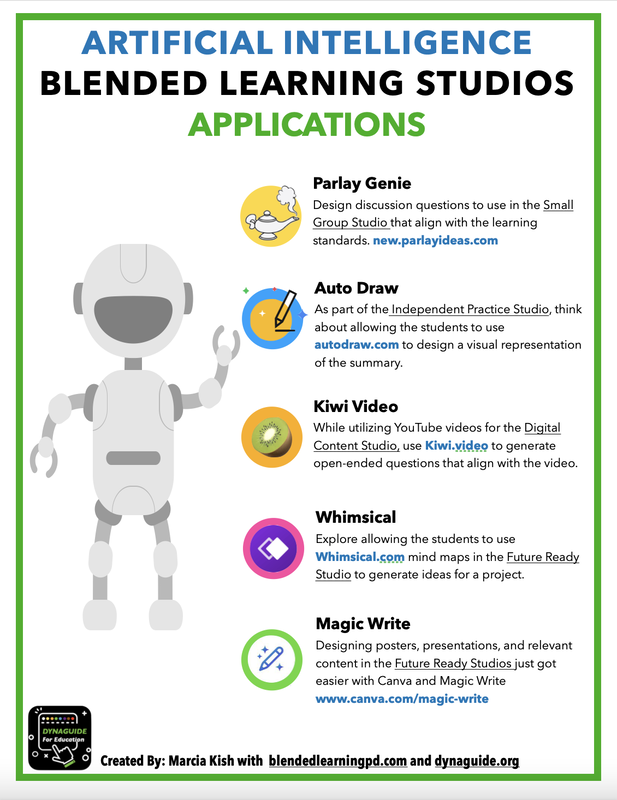
Independent PracticeThe Independent practice studio allows the students to showcase their understanding of the learning targets. Of course, the use of AI tools does not fit in this studio. However, using Autodraw helps the students visually display the sequence of events, the setting, or predictions that align with the book study objectives. The Autodraw tool allows the students to draw their images and use the magic pen to determine the possible photos related to the thought process. Digital ContentHave you ever used YouTube in the classroom as a second teacher? Or have you used EdPuzzle to check for understanding of the content within the video? But have you found a YouTube video that you really like and wish there were questions already made for the students to answer after watching the video? Well, that is what Kiwi Video does for you. Drop any YouTube video into the application, and it will generate a quick quiz and a summary of the video for a quick check that aligns with the video. Also, take a moment to watch the TedTalk for how Khan Academy will be using AI as a personalized learning tutor. It is worth the time to watch and learn about the power of AI tools in the classroom. Future Ready StudioThe Future Ready studio is where students can showcase their understanding of the content through relevant mini-projects. If you are new to the future-ready studio terminology, think of this studio as the higher-order thinking skills. This is where the students can create, collaborate, communicate, use critical thinking skills, and connect the content to real-world scenarios. Whimsical is one of my favorite AI tools to help support the students through the Fish Bowl learning process. Whimsical is an online application that will take a question and develop a step-by-step guide for answering the question. The mind map can then be used for creating more in-depth relevant projects. For the last few years, I have been promoting and using Canva as a creation tool for the future-ready studio. The tools and resources are so easy to use that the creation aspect is very user-friendly. Now, Canva has added Magic Write, which enhances the creation and thought process similar to ChatGPT. For those students that need help to get started with a project, this AI tool generates the starting point for the students.
3 Comments
<a href="https://netus.ai/">bypass ai detection</a> 2/13/2024 11:38:11 am
Welcome a new arrival or celebrate an upcoming birth with a soft and cuddly stuffed toy. For plush animals, soothing rattles, or plush blankets adorned with adorable characters to delight the parents-to-be. 2/28/2024 11:35:22 am
Clay or concrete tiles provide a Mediterranean-inspired aesthetic suitable for many historic architectural styles. These durable materials offer rich colors and intricate textures, enhancing the visual appeal of historic homes while withstanding the test of time. Leave a Reply. |
AuthorS
Marcia Kish - Blended and Personalized Learning coach that designed the Three Phases of Blended Learning Categories |
 RSS Feed